
Language technology
How to choose a terminology management tool in six steps
 Anita Racz
· 3 min read
Feature lists of terminology tools look alike, and every demo is convincing. The organizations that end up happy with their choice start from their process and requirements, not from the product.
Start with discovery, not demos
Before you look at any tool, document your current state: existing terminology resources, workflows, the technology ecosystem and the people involved. Then define the desired future state. Two questions shape almost every requirement:
- Who will use it? A handful of terminologists, or hundreds of writers, engineers and reviewers who only need quick lookup?
- Where must terms appear? In your TMS and CAT tools, authoring tools, machine translation, CMS, or an AI assistant?
Requirements checklist
- Central, web-based access from anywhere, as a single source of truth.
- Effortless lookup with little or no training for basic users.
- Customizable entry structure and search filters that match your metadata model.
- Workflows and access rights for term requests, review and approval.
- Tool independence: import and export in standard formats such as TBX, so data can move into any CAT tool.
- Integrations with your TMS, CAT, authoring and content systems, via connectors or an API.
- Scalability for more languages, users and business units.
- Total cost of ownership: licences, technology, support and maintenance, not just the price per seat.
The tool landscape
Terminology functionality comes in three broad flavors:
- Dedicated terminology management systems such as Kalcium Quickterm and TermWeb, built for enterprise-wide workflows and broad user access.
- Termbases inside translation tools, such as Trados MultiTerm, memoQ and QTerm, Phrase or Wordbee, convenient when translation is the main use case.
- Authoring and content-governance tools such as Acrolinx and Congree, which enforce terminology at the source while writers create content.
Many organizations combine them, for example a central termbase that feeds both the translation tools and an authoring assistant. As an independent consultant, I have worked with all of these and recommend whatever fits the stack and the budget.
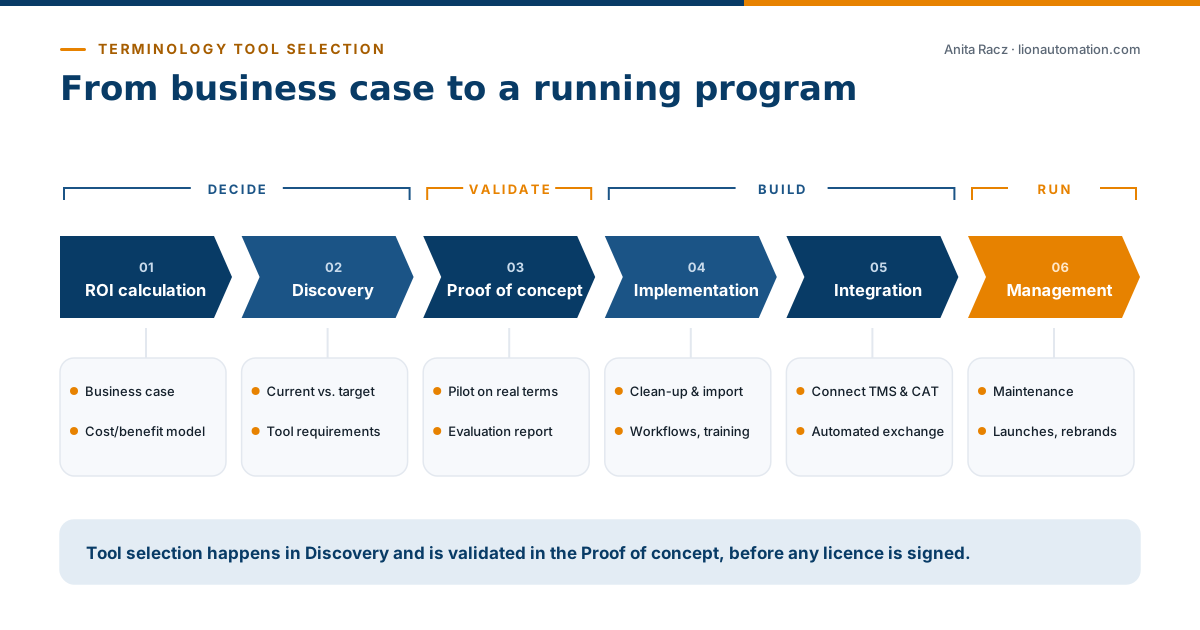
A six-phase roadmap
- ROI calculation: validate the business case (see terminology management ROI).
- Discovery and recommendations: compare the current and desired state, define technical requirements, shortlist tools.
- Proof of concept: import a sample of real multilingual terms, gather stakeholder feedback and document gaps in an evaluation report.
- Implementation: centralize, clean up and import term resources, set up workflows, train users.
- Integration: connect the termbase to TMS, CAT, MT and authoring tools and automate data exchange.
- Management: maintain the termbase, add terms for new launches and keep governance running.
Common mistakes
- Choosing on features alone and underestimating the clean-up and migration effort.
- Designing for terminologists and forgetting the casual users who make up most of the audience.
- Skipping the proof of concept, then discovering integration gaps after the contract is signed.
- Going live without owners, so the termbase slowly goes stale.
Frequently asked questions
What is the best terminology management software?
There is no single best tool. Dedicated systems suit enterprise-wide programs with many casual users; termbases inside CAT/TMS tools suit translation-centric teams; authoring tools add enforcement at source. The right choice depends on your users, integrations and budget.
Do I need a separate terminology tool if my TMS has a termbase?
Not always. If terminology mainly serves translators, a TMS termbase may be enough. If writers, engineers, marketing and AI applications also need it, a central terminology system usually pays off.
What should a terminology proof of concept include?
A sample of real multilingual terms imported into the candidate tool, the target metadata structure, a test of key workflows and integrations, stakeholder feedback, and a short evaluation report.