
Terminology database
Termbase vs. glossary: how to build a terminology database that scales
 Anita Racz
· 3 min read
Most organizations already have terminology. It lives in spreadsheets, style guides, vendor glossaries, emails and the heads of experienced reviewers. The problem is not a lack of terms; it is that nobody can tell which version is right.
What a glossary is (and where it stops)
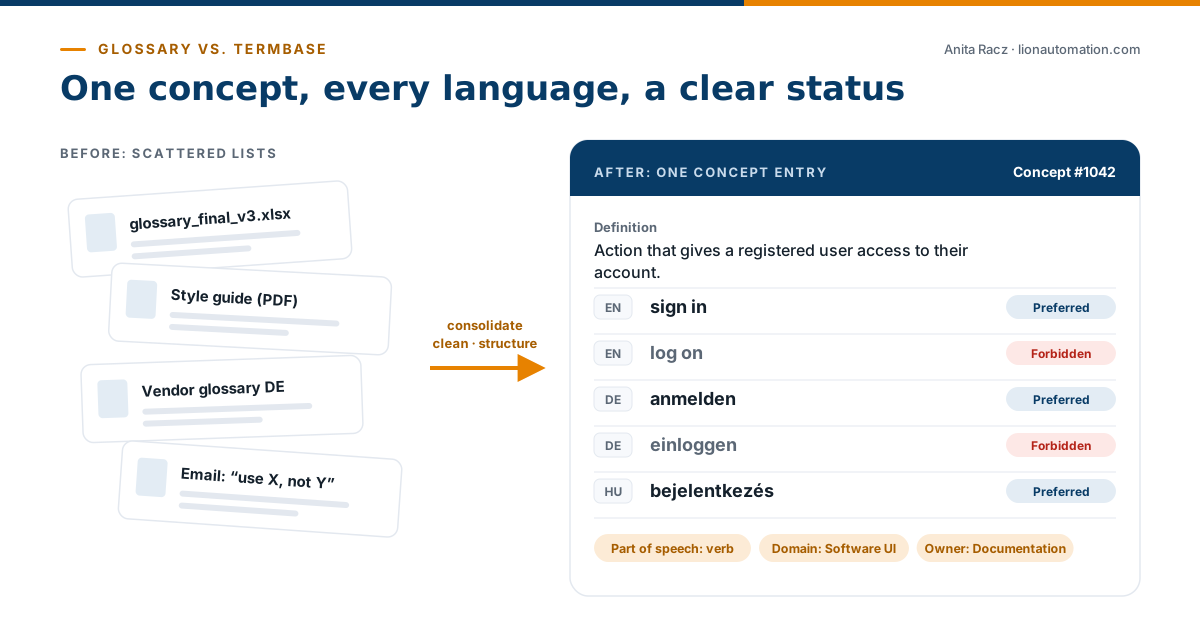
A glossary is a list: usually two columns, source term and translation, created for a project or a vendor. Glossaries are quick to make and easy to share, which is why they multiply. After a few years you have glossary_final_v3.xlsx, a German vendor list, a style guide PDF and an email that says “use X, not Y”, and they contradict each other.
Glossaries typically have no status (approved or not?), no owner, no definitions and no history. They also cannot be queried by your translation, authoring or AI tools in a reliable way.
What makes a termbase different
A termbase, or terminology database, is structured around concepts, not words. Each entry describes one concept and holds every term used for it, in every language, with metadata:
- Definition and context, so translators and writers know what the concept means.
- Usage status: preferred, admitted or forbidden. Forbidden terms are what lets QA and authoring tools flag the wrong variant automatically.
- Classification such as product line, domain or content type, which powers search filters.
- Administrative data: owner, source, approval date.
| Glossary | Termbase | |
|---|---|---|
| Structure | List of term pairs | Concept entries across all languages |
| Status | Usually none | Preferred, admitted, forbidden |
| Context | Rarely | Definitions, usage notes, examples |
| Access | Files emailed around | Central, searchable, role-based |
| Integration | Manual import per project | Connected to TMS, CAT, MT and authoring tools |
| Maintenance | Copies drift apart | Governed workflow with owners |
Five steps to build a termbase
- Inventory your sources. Collect every glossary, style guide and term list, and note who uses each one.
- Design the entry structure. Define the metadata fields and picklists your organization actually needs. Keep it lean: every field must have someone who maintains it.
- Clean up and harmonize. Merge duplicates, resolve synonyms into one concept, and decide preferred and forbidden variants. This is usually the largest effort, and the most valuable.
- Import and validate. Use import style sheets and duplicate reports to catch errors, then run a post-import clean-up.
- Roll out with templates and training. Provide templates for new term requests, workflow diagrams and short training for translators, editors and other stakeholders.
At Becton, Dickinson and Company, I designed the complete termbase architecture for the diagnostics business unit, with custom workflows and documentation. The structure worked well enough that a second business unit later adopted it.
Design tips that pay off later
- Stay tool-independent. Make sure your data can be exported in a standard format such as TBX, the ISO standard for terminology exchange.
- Plan for integrations from day one. The termbase will feed CAT tools, machine translation and possibly AI assistants; see AI-ready terminology.
- Make lookup effortless. Most users only search. If that takes more than a few seconds, they will go back to their spreadsheets.
Frequently asked questions
What is a termbase?
A termbase (terminology database) is a structured, usually multilingual database of an organization’s concepts and approved terms, with metadata such as definitions, usage status and domain.
What is TBX?
TBX (TermBase eXchange) is the ISO standard XML format for exchanging terminology between tools. Exporting to TBX keeps your termbase independent of any single vendor.
Can I build a termbase in Excel?
You can collect and clean terms in a spreadsheet, but a spreadsheet lacks workflows, access control and integrations. It works as a starting point, not as the long-term home of your terminology.